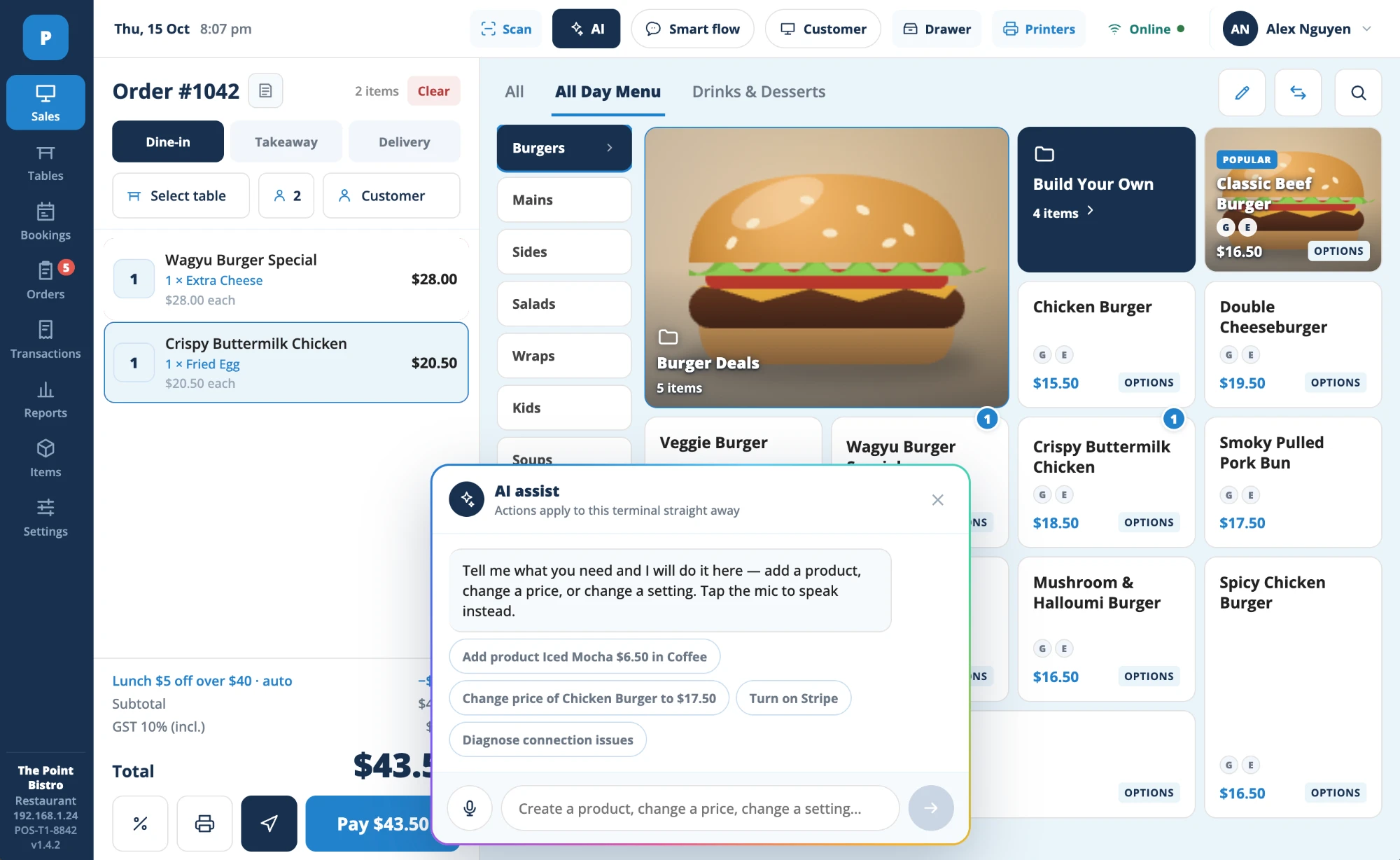
mintti is a point of sale with an assistant built in. Change prices, fix a payment that went wrong or plan tomorrow's prep in one sentence, typed or spoken. It shows you exactly what will change. You approve, it's done.
A point of sale that solves problems instead of making them.
Most systems give you a thousand settings and leave you to find the right one. mintti works the other way round: you describe the outcome, and it finds the setting, makes the change and shows you the result.
It also watches your sales, stock and staffing all day, and tells you about the few things that need you, with the fix already drafted.
Built for
Cafés, restaurants, food courts and small shops, from one location to twenty
Start price
Free for one location, with no time limit
Hardware
Any iPhone, Android phone, iPad or Android tablet. Add a printer or cash drawer later if you want.
Offline
Orders, payments and the kitchen screen keep working. Everything syncs when you're back online.
Set-up
Send us your menu tonight and take your first order tomorrow
mintti AI
Four things mintti does every shift, so you don't have to.
Each one ends in a clear suggestion you can approve, edit or ignore. Nothing changes until you say so.
Fixes problems in the chat
Double charges, a refund to the wrong card, a printer that stopped, an order stuck in the kitchen. Describe it the way you'd tell a colleague. mintti finds the cause, explains it, and fixes it or tells you the one step to take.
Resolved in 40 seconds
"Kitchen printer stopped at 7:12pm. 3 tickets were held, not lost. I've sent them to the kitchen screen and the printer is back online."
A one-minute morning brief
Yesterday's takings, what sold and what didn't, and two specific things to do today. It's waiting when you open the app, so you never need to dig through reports.
Wednesday, Oct 15
Yesterday's sales$3,964.20
Top sellerBeef pho · 112
Today: prep 20% more broth for the lunch rush, and switch off the mango smoothie until the delivery arrives.
Stock and prep forecasts
mintti forecasts how much of each item you'll sell, hour by hour, a week ahead. Prep lists and purchase orders follow the forecast instead of a guess, and every recipe draws down ingredients down to the gram.
Rice noodles, Saturday22 kg
On hand9 kg
Suggested order15 kg by Friday
Fill the quiet hours
When a slow window is coming, mintti drafts an offer that fits it: what to promote, for how long and to whom. You see the expected effect first, then approve or adjust it.
Tuesday 3pm–5pm usually 40% below average
Suggested: iced coffee and any pastry for $8.50, shown to regulars within 2 km.
Why it's different
Stop working for your POS.
The same jobs every venue does each week, done the usual way and the mintti way.
01
Change prices
A supplier put prices up. Your menu needs to follow.
The usual way
SettingsMenuCategoryItemPrice
Repeat for every item, then check the delivery apps match.
Time spent40 min
With mintti
"Raise all noodle dishes by 10% from Monday"
Preview, then approve1 sentence
02
Fix a payment problem
A customer says they were charged twice.
The usual way
Find the receiptCall supportWait on holdRefund
The customer waits at the counter while you search.
Time spent25 min
With mintti
"Table 7 says they were charged twice"
Found, explained, refunded1 tap
03
Decide what to do today
Sales, stock, staff and offers all live in different places.
The usual way
SalesStockRosterOffersReviews
Five reports, and you still have to work out what they mean.
Reports to read5
With mintti
"Push the lunch set today. Lunch is forecast 18% busier than usual."
Approve or edit1 decision
How it works
Ask. Check. Approve.
Every request follows the same three steps, so you always know what mintti is about to do.
1
Ask in your own words
Type or speak, in the language you think in. No menus to learn, no settings to find.
"Make the brunch menu vegan-only this weekend"
2
mintti checks and drafts
It looks at your menu, stock and sales, then shows you exactly what will change and why.
Items hidden9
Vegan items shown12
RunsSat–Sun
3
You approve, it's done
One tap applies it everywhere: counter, kitchen, QR menu and delivery apps. Undo is one tap too.
Vegan brunch menuLive
Features
Everything the counter needs. Nothing it doesn't.
One system for the front, the kitchen and the back office, with the assistant built into all of it.
Run it by chat
Prices, menus, stock, staff and offers can all be changed by asking. mintti handles the settings for you.
Answers, not dashboards
Ask "What sold best after 3pm last week?" and get a clear answer with the numbers behind it.
Fast checkout
Card, tap, QR and cash. Split the bill by item or by person in a few taps.
Staff and permissions
Clock-ins, roles and PINs. Decide who can discount, refund or approve a change from mintti AI.
Many locations, one view
Compare sites, share menus and move stock between them. Ask about one store or all of them.
Works on what you own
iPhone, Android, iPad or Android tablet. No special terminals to buy or lease.
Modules
Add what your venue needs. It all runs as one system.
Every module shares the same menu, orders and customer records, so nothing is entered twice. And every module can be run by asking mintti AI.
Kitchen Display Screen
Orders from the counter, tables, kiosk, QR and delivery apps land in one queue per station. Tickets change colour as they run late, and allergy notes sit at the top.
"Which dishes are slowing the kitchen tonight?"
Customer Facing Screen
Customers watch their order build item by item, with prices, discounts and the total shown before they pay. Between orders it shows your specials.
"Show the lunch set on the customer screen until 2pm"
Kiosk
Guests order on a self-service kiosk or tablet stand, with photos and modifiers, then pay by card or QR. The order goes straight to the kitchen.
"Turn the kiosk off at 9pm on weeknights"
QR Code Ordering
Guests scan the code on their table to order and pay from their own phone. Every order joins the table's tab, so splitting the bill stays simple.
"Make new QR codes for tables 20 to 28"
Reservation and Queue
Take bookings online, run walk-ins through a digital queue and text guests when their table is ready. The floor plan shows who's seated and who's next.
"How many tables for four are free at 7:30pm Friday?"
Delivery Partner Integration
Uber Eats, DoorDash and HungryPanda orders arrive in the same kitchen queue as everything else. Menus, prices and sold-out items stay in sync across every app.
"Pause DoorDash orders for the next 30 minutes"
Stock Ordering
Build purchase orders from your stock levels and forecast, send them to suppliers by email and tick deliveries off as they arrive. Stock counts update when you receive.
"Order next week's dry goods from Harbor Supply"
Invoice OCR
Take a photo of a supplier invoice. mintti reads the items, quantities and prices, matches them to your purchase order and flags anything that doesn't add up.
"Why is the Fresh Co invoice $42.80 more than the order?"
Mini BI
Sales, margins, staff costs and stock in clear charts, for one location or all of them. Ask a question and get the chart, instead of building a report.
"Compare weekend margins for the last 3 months"
Pricing
Start free. Pay when you grow.
Every plan includes payments, the kitchen screen and offline mode. Prices are per location, per month.
Prices in USD, before tax. Volume pricing from 5 locations.
Questions
Frequently asked questions
What is mintti?
mintti is a point of sale for cafés, restaurants and shops with an AI assistant built in. You can run it by asking in plain words, typed or spoken, and it handles the settings, fixes problems and suggests what to do next.
Can mintti change things without me?
No. mintti always shows you what it's about to change and waits for your approval. Every change is logged, and you can undo it in one tap. Owners decide which staff can approve which kinds of change.
What kinds of problems can it fix?
Day-to-day issues: duplicate charges, refunds, voided orders, a printer or card reader that's dropped off, an order stuck in the kitchen, a price that's wrong on a delivery app. If something needs a person, mintti tells you exactly who to contact and what to say.
Does it work offline?
Yes. Ordering, payments and the kitchen screen keep running without internet. When the connection returns, everything syncs automatically with no lost or duplicated orders. The assistant needs a connection to answer questions.
What hardware do I need?
A phone or tablet you already own is enough to start. You can add a receipt printer, cash drawer or kitchen screen whenever you're ready.
How quickly can I start?
Upload a photo or PDF of your menu tonight. mintti turns it into items, prices and modifiers for you to check, and you can take your first order tomorrow.
Spend less time running your POS and more time running your venue.